Showing posts with label assessment. Show all posts

Thursday, 26 June 2014

Technology & Assessment: Infographics

On the surface, Infographics appear to be a bit of a fad these days. Cute, colorful, visual representations of information and statistics intended to amuse, titillate, and capture the attention of their 21st century audience. But there is more to infographics than meets the eye, and this presents some interesting possibilities from an assessment point of view.

Infographics as Visual Language

Italian designer, Fancesco Franchi, sees infographics as a narrative language -- as "representation plus interpretation to develop an idea". The designer interprets content and adds his/her interpretation in order to make the content meaningful for the audience. Using this medium, the story doesn't need to be linear or one-dimensional (like a Powerpoint presentation), but can provide multiple entry points for the viewer to engage with the content and make his or her own meaning. This requires something much deeper and more complex than just adding clever graphics to some information!

Making Student Thinking Visible

As a classroom teacher, I can appreciate that this type of "new language" requires time, practice and feedback to master, but I can also see the tremendous potential it contains for seeing the complex thinking processes of my students.  And while I may struggle to fully comprehend how or why a student represented something in an infographic in a particular way, it certainly opens the door for conversations about the thinking that took place. As such, infographics can be a rich tool for making student thinking visible and engaging in metacognitive conversations!


Tools and Other Resources for Creating Infographics

Eight Types of Infographics Teachers Should Know About - Interesting and comprehensive article by Educational Technology & Mobile Learning

Teaching With Infographics: Places to Start - NY Times, August 23, 2010

Easel.ly - Read a review of this product on the Lethbridge College Learning Connections website

Piktochart - Read a review of this product by Common Sense Media's website: Graphite

Visme (formerly EWC Presenter) - Read a review of this product on the Teacher's First website

Infogr.am - Read a review of this product on the Lifehacker website

Thursday, 29 May 2014

"Project-based Learning" meets "Performance-based Assessment"

The trend toward project-based learning stems from our desire to provide learning opportunities with real-world applications that are engaging, cross-curricular, student-centered and meaningful. Project-based learning encourages creativity and innovation, and accommodates a variety of learning styles and strengths. Because of its open-ended, collaborative nature, there are challenges associated with the assessment of student learning within the context of project-based learning.

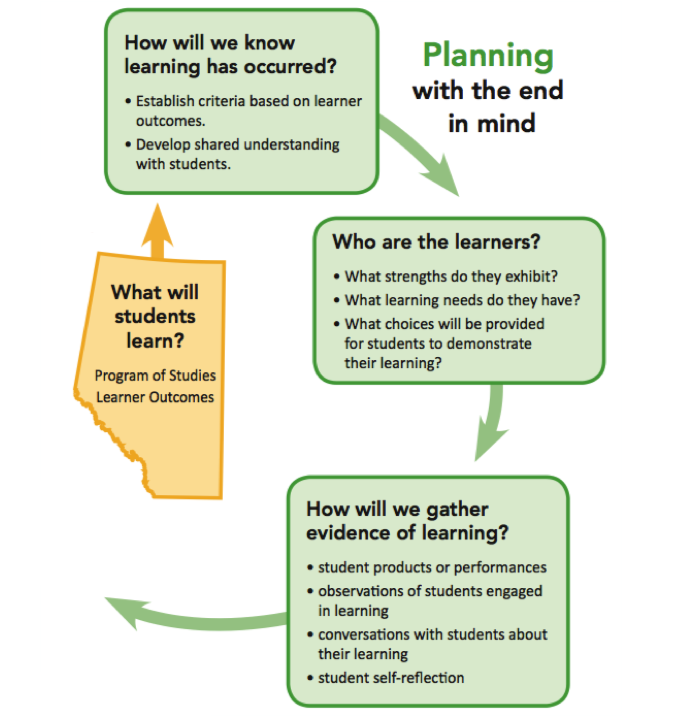
From the AAC Key Visual
As always, when we plan for assessment in Alberta classrooms we begin with outcomes from Alberta Programs of Study. Typical projects in a PBL classroom likely address a large number of outcomes from a variety of subject areas. When we begin to plan a project, we identify specific learning goals connected to those outcomes and plan ahead for the ways in which we will assess student learning. Project-based learning requires performance-based assessment: giving student the opportunity to demonstrate what they know and can do through their work on a variety of tasks.

After we're clear on our learning goals, we identify the criteria we will use to assess out students, and then consider how we'll help them build an understanding of what success will look like for those criteria. Because the scope of a project is often quite broad, it's appropriate to plan a variety of performance assessments along the way, to allow us to gather evidence of learning for a more manageable number of outcomes and learning goals.

We gather that evidence through recorded observations of students as they work on the project and conversations with students about their learning, as well as by considering their finished products and performances. Being clear about our specific learning goals and how we will assess them at the beginning of the project helps us focus on those key goals. This in turn makes it more likely that students will successfully meet those goals. We provide students with many opportunities to reflect on their learning during and after the project, and encourage them to set next steps and goals for further learning.


Performance-based assessments in the Alberta Assessment Consortium collection are smaller in scope than most projects in a PBL classroom, but can provide a useful model for assessing students in this environment. The teacher materials for every task include a chart outlining the curricular outcomes being addressed by the task, linked to criteria for assessment. The criteria addressed by a task are manageable in number, and are made explicit for students in the task itself. The very same criteria appear again on the rubric used to assess student learning. Take a look at some of these tasks, and consider how a similar model might help you support and assess student learning within a project-based learning context.

Friday, 2 May 2014

AAC Assessment Materials Support Teachers in Achieving the Vision of Inspiring Education

View of the NEW Competency Connections
tab on the AAC website
Performance Assessment Update: Task Specific Competency Connections

Alberta is in a time of transition. A new Ministerial Order is now in effect which outlines expectations for student learning, including a focus on literacy, numeracy, and competencies. Although curriculum prototyping is underway, the results of which will inform the development of the new programs of study, the existing programs of study are still in effect.

Gr. 9 Social Studies: Papaschase Land Claim
Task Outcome/Criteria Correlation

The Ministerial Order states that "competencies are interrelated sets of attitudes, skill and knowledge that are drawn upon and applied to a particular context for successful learning and living, are developed over time and through a set of related learner outcomes." It has not yet been determined whether the competencies will be addressed separately from the outcomes or embedded within the assessment of outcomes.

During this time of transition, AAC performance tasks will continue to link the assessment criteria to the existing learner outcomes. However, a separate document has been provided that shows the specific competencies that are addressed within the task. For educators who are grappling with what the "new" competencies might look like in action, the AAC competency connection and task specific outcome/criteria correlation documents can provide concrete examples to consider.
Gr. 9 Social Studies: Papaschase Land ClaimTask Competency Connections

Browse through the library of Performance Assessment Tasks on our website (like the Papaschase Land Claim PA Task shown on this page) and have a look at how the Outcomes/Criteria of the task align with the competencies in the related Competency Connection documents. We hope that by making links between the familiar language of outcomes and criteria to the potentially not-so familiar language of competencies, you might gain some clarity around what the competencies look like in the classroom.

We'd like to hear from you: 

  • Does this process help you to gain clarity about what the new competencies entail? 
  • Are there questions that arise when doing so? 
  • What additional support do you require to assist you in this process?


Wednesday, 26 March 2014

Mini Whiteboards For Feedback

Mini whiteboards are a great formative assessment tool. Teachers can use mini whiteboards in classrooms in many ways to facilitate the exchange of feedback. A video showing several such ideas is available on the AAC website, near the bottom of this page: Formative Assessment: Whiteboards (Video) 

Some ways to use mini whiteboards as feedback tools include:

  • Whole Class Feedback
    • The students answer a question and hold up their responses. The teacher scans the room and decides what to do next, based on the student responses.
  • Teacher Feedback to Individuals
    • The students work on a problem on the whiteboards. The teacher circulates. The bright colours make it easy to spot student errors and misconceptions and provide immediate feedback.
  • Peer Feedback
    • Students work through a problem, and then compare solutions with a partner. They provide feedback to each other.
    • Students could be grouped for discussion based on their answers to a question.

Tuesday, 25 March 2014

Sound Assessment Practices within Technology Rich Environments - a Collaborative Partnership with 2Learn.ca


AAC and the 2Learn.ca Education Society are once again participating in a collaborative partnership, funded by a grant from Alberta Education.  Through a variety of technology mediated processes, this project supports Jurisdictional Technology Contacts and other lead individuals who are working to support teachers in the classroom. A series of free, 45 minute webinars linking assessment and technology have been delivered this year, with two more remaining before the end of the 2013-2014 school year.

Past webinar topics have included:
  • Mobile Devices: More than Apps 
  • Digital Feedback Tools 
  • Data Collection Tools: What Do They Really Tell You?
  • Infographics: Don't Be Fooled by Appearances 
  • Digital Forms and Assessment 
Please note: Webinar support materials can be found on the AAC website with additional resources being posted as they become available. Check back often for updates. 

The remaining 2013-2014 webinars are:

April 23, 2014, 3:45 - 4:30 PM - Your Learning Story Done Differently: ePortfolios in the Classroom
  • This is not your typical ePortfolio session.  In this session we will share a variety of tools, strategies and principles that teachers can use to help students personalize their ePortfolio stories. Participants will learn how students can share their stories using tools that complement their learning styles and mobile lives. NOTE: To register for this webinar, please click on the webinar title above.

May 14, 2014. 3:45 - 4:30 PM - Visual Thinking Tools/Assistive Technology
  • Assistive technology can be a powerful tool in the classroom that supports the success of all learners.  In this webinar we will look at one form of Assistive Technology, visual thinking tools, and explore how VTT’s can help students organize their thinking and provide a gateway for students to express what they know, what they can do, and what they understand. NOTE: To register for this webinar, please click on the webinar title above.
If you would like more information on any of the webinar topics, please contact sid@aac.ab.ca, pete@2learn.ca or daryl@2learn.ca. We would be happy to chat with you and support you in any way we can.